Using Ask Studio to Generate YouTube Content Ideas for Your Business
Unless YouTube monetization is 100% of your business growth strategy, you probably find yourself navigating a tension between content strategies that help you grow your YouTube channel and those that grow the business. And that matters a lot to how you generate and vet content ideas for development, because those two pathways can produce vastly different videos and vastly different results.
As a YouTube content creator, you might have played with the “Ask Studio” AI feature inside YouTube Studio. It’s an AI assistant for YouTube creators.
I haven’t spent too much time with it, but I have found it useful for generating content ideas that have the potential to grow both my channel and my business.
As a note: You need to be logged in to YouTube using a web browser (e.g., Chrome) to use the Ask Studio feature.
Why Use Ask Studio to Generate Video Content Ideas
There’s a timeless question in content marketing: how do you generate new ideas?
Most of my ideas come from client work or related conversations. But there are times when the conversations I’m having with clients are answering questions or covering topics I’ve already addressed with content, and when my list of ideas just isn’t sparking enough interest to develop anything there. Short of repurposing, that can leave me in a rut with respect to new ideas.
So where can you turn for outside help?
The YouTube app has a Trends/Explore tab that can, as the name suggests, help you see what’s trending on YouTube. This information is relatively generic, and is more for showing what happens to be popular at the moment than finding opportunities for your own content.
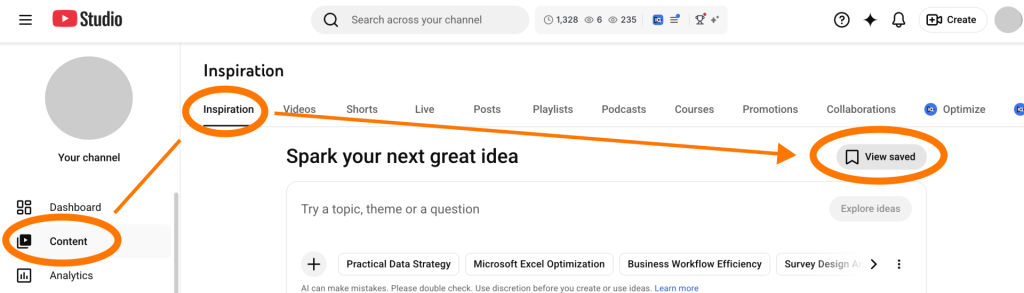
YouTube Studio’s Inspiration feature takes this a step further. You can find it under the Content menu, along with your Videos, Shorts, and Playlists. Here, AI will generate ideas (usually in the form of title/thumbnail pairs) based on what your audience is watching and searching for – blended with what’s trending more generally and other platform data. The title/thumbnail pairs are okay as possible starting points, but the Inspiration interface keeps you pretty confined to surface-level feedback loops (i.e., save, reject, or explore ‘more like this’).
This is where Ask Studio comes in. As a conversational AI that draws from your channel’s data and YouTube platform patterns, its interface gives the most flexibility in terms of exploring content ideas.
How to Use YouTube’s Ask Studio to Generate Video Ideas
From YouTube Studio, you can start up Ask Studio using the sparkle/diamond icon at the top of the web page (pictured below).
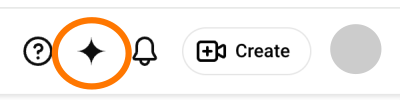
This opens a chat window that contains some chat suggestions, including: “suggest new video ideas”.
I like to go beyond this, because what’s performed well in the past doesn’t necessarily align with my current direction, but I might want to “hold” both as considerations for creating new content. So I start by typing in the following:
“Based on recent video performance, as well as the videos I’ve uploaded more recently as an indicator of the types of content I’d like to create, suggest new video ideas for my channel.”
Depending on where I’m at with this, Ask Studio might recognize a “shift” in direction as part of its response.
It’ll also tell me what it considered to generate new ideas. This list usually contains factors like recent uploads, which videos are currently driving the most “interest” (e.g., UTM and Excel troubleshooting content), and its own comment analysis to identify recurring view “pain points.”
Then it’ll list out some suggestions.
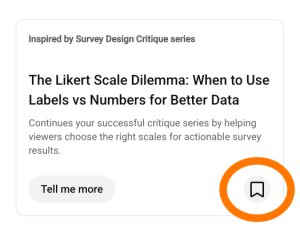
Since I started using Ask Studio, the interface for this has changed a bit, and now includes a little bookmark icon (pictured above) that will save any idea generated to the Inspiration section of YouTube Studio – which you can always find again under Content > Inspiration > View saved (pictured below).
I could stop there, but …
Before leaving this exploratory chat, I like to have Ask Studio explore these options a bit more, because the saved Inspiration will generate slightly different explorations due to the fact that those Inspiration explorations don’t have the context from this initial chat.
Once I have those initial ideas explored a bit more, I do two things: (1) I copy and paste those responses back out into my own file and (2) sometimes, I also save the “refined suggestion” to Inspiration as well.
Clarifying and Refining the Idea Seed
The copy and paste file allows me to annotate with highlighting as well as compare and incorporate some of the saved Inspiration notes, which gives me the basis for fleshing out and really considering the suggestions.
I start by highlighting any shift-related information that Ask Studio has identified. After that, I’ll go through and highlight the headers for the individual ideas so I can start grouping that data together for myself.
Then I go into Inspiration, get a cold read on the idea – using the new analysis of the idea from Ask Studio – and combine anything interesting in there with the saved notes I already have.
And then I look things over to see if I care at all about making this video.
Business Growth vs. YouTube Channel Growth: Vetting Video Ideas
At first glance, this might seem like a false dichotomy.
YouTube channel growth might be 100% of your business growth plan.
But that’s not my situation.
I’m a consultant first and foremost, and a solopreneur, so my channel might be something I monetize on the side, but it needs to also serve a different function.
Assessment Criteria
Since the goal of this article isn’t to guide you through creating or refining your own content strategy, I’m sharing just the most important criteria I use that help me navigate the tension between platform and business growth, and keep me aligned with my business vision.
Consulting Alignment
As a first pass, I review to see if any of the particular content suggestions are things I think my clients need to know about. This is a separate consideration from just growing my channel for the channel’s sake, although both could grow the business in different ways.
But, honestly, if it’s not something I’m willing to consult for in the future, or a question I’ve answered for a client in the course of a past engagement, then I usually skip the idea entirely.
Reach and Audience Alignment
Reach – eyes on your content – is obviously needed for both YouTube and business growth. While I want to maximize reach, virality – and the poor fit audience for my services that might come with it – doesn’t serve my business. In fact, enough of this type of content could skew my audience – and the way the algorithm serves up my content – away from my intended target groups.
One interesting thing here: Regardless of fit, the Ask Studio title suggestion as well as what it thinks the video should cover can be an interesting insight into terminology – maybe not in terms of what humans will use, but what algorithms might associate in terms of search queries and the content it’ll serve up in response. That might present an opportunity to explore the idea a bit more – but with different title packaging.
Idea Prioritization
Sometimes I’ll get a suggestion that reinforces an idea that was already on existing idea list – but that I was waffling on for some reason. Seeing it or something similar pop up on the Ask Studio list of suggestions can eliminate my waffling and bump the idea up the priority scale as something to produce sooner rather than later.
Spark
This criterion is completely subjective, but incredibly important for me as the voice over – and sometimes featured face – of my video content.
If I can’t get excited about a topic (or at least feel a real interest in it), then I’m going to sound – and look – like my audience shouldn’t care about it, either. That’s a flop waiting to happen. My time and effort are better spent elsewhere.
Saving the Good Ones (Viable Ideas Only)
Ideas that pass the assessment criteria get moved over to my running list of content ideas. Then I delete the copy/paste document, as this isn’t really the type of document you go back to, so holding on to it is really just adding digital clutter. Besides, once you’ve added new content to your YouTube channel, you’re better served by starting a new exploration of possibilities from where you’re at “now” than trying to mine gold from where you were “back then.”
Where to go from here?
This process can get ideas on your list if you’re in a rut.
The next natural step might feel like production and workflow considerations: style choice (e.g., voice over or talking head), video recording and editing technicalities, platform-specific packaging concerns to get it out in front of your audience (e.g., title, thumbnail, chapters), and other distribution plans to maximize reach.
But, in between those two steps, you still have some questions to answer as you vet your own idea suggestions:
- “Is this something I’d consult on, is this something my clients need?” If your answer here is uncertain/fuzzy, or you find yourself saying ‘yes’ to every suggestion, you might need to clarify your business’ positioning or direction (including what you consider a ‘successful business’) before you start churning out (additional) content.
- “Have I been optimizing for views or fit?” This is a question about reach, and is really another way of asking: “What results should my content strategy – and these videos in particular – deliver?” If you’re not sure how to define the ‘next step’ someone should take after watching, then your overall content strategy probably needs some attention.
If you want help figuring out how to answer these questions, or how to define your workflow as a system that helps you generate ideas for and consistently create videos that feed your business, reach out.
—
All product and company names are trademarks or registered trademarks of their respective holders. Use of them does not imply any affiliation with or endorsement by them.